How to Extract Data from Large, Complex Documents with AI
The short answer: don’t feed a 400-page document to an AI model and hope. First turn it into clean, structured text that keeps its tables and headings. Then build a map of its sections, follow every internal reference, and only then ask the AI to pull out the facts you need. Every extracted value should point back to its page, and anything the system is unsure about goes to a person.
Many businesses run on large documents: technical manuals, tender packs, product specifications, research reports, financial statements. They are long, packed with tables, and full of lines like “as described in Section 4.2” or “see Table 7”. Getting reliable data out of them is the first step to any useful AI project. If this step is weak, every chatbot or agent built on top inherits the errors.
Why big documents break simple AI tools
- They don’t fit, or they fit badly. Even models with huge context windows (the amount of text they can read at once) get less accurate on details buried in the middle of a very long input. Bigger inputs also cost more on every request.
- Tables and layout get scrambled. A naive PDF-to-text step reads a table row by row across columns and turns it into nonsense.
- Scans are images, not text. Photocopied or low-quality pages need OCR (optical character recognition, software that reads text from images) before anything else.
- The answer is in two places. A rule in Section 3 often depends on a table in an appendix and a term defined in the glossary. Read only Section 3 and the AI will guess.
The seven-step strategy
1. Intake and triage. Sort incoming files by type (PDF, Word, spreadsheet, image), by quality, and by whether they are digital or scanned. Each kind takes a different path. A bad scan should not take the same route as a clean digital file.
2. Read the pages properly. Use layout-aware tools that recognise headings, columns and tables, and run OCR on scanned pages. Keep the page number on every piece of text. You will need it later to prove where an answer came from.
3. Map the structure. Turn the headings into a tree: document, chapter, section, sub-section, table. Store it as structured data (JSON). This map is what lets you split the document by meaning, one section at a time, instead of chopping it every 1,000 words and cutting a table in half.
4. Link the references. Find every “see Section 4.2”, “Table 7” and defined term, and connect it to the place it points to. This is the step most projects skip, and it is where most accuracy is won or lost. More on it below.
5. Extract to a schema. A schema is a fixed list of the fields you want, with their type: “total value: number, with currency”, “start date: date”, “owner: text”. Ask the AI to fill that list section by section, and to return the page and section for every value it fills.
6. Check and score. Run plain rules on the output: dates are real dates, totals add up, required fields are present, values agree across sections. Give each record a confidence score. High-confidence records go straight through. Low-confidence ones go to a person.
7. Load and index. Store the results in a database for reports and systems, and in a search index for AI assistants. Keep versions, so when a new edition of a document arrives you can see exactly what changed.
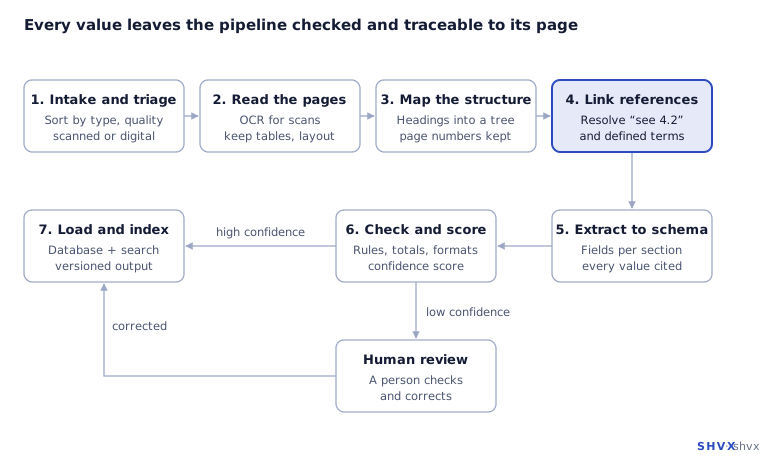
The flow runs left to right along the top, then right to left along the bottom. The one branch is the confidence check: confident results load straight away, unsure ones get a human review first.
Cross-references: the step that makes or breaks accuracy
Think of how a person reads a manual. When the text says “see Table 7”, they flip to Table 7, read it, and come back. An AI model reading one section at a time can’t flip pages, so we do it for it.
Using the document map from step 3, the system finds each reference, looks up its target, and builds a context packet: the section being read, plus the exact table, clause or definition it points to. The model reads the packet, not the lone section. It now has everything a careful human would have open on the desk.
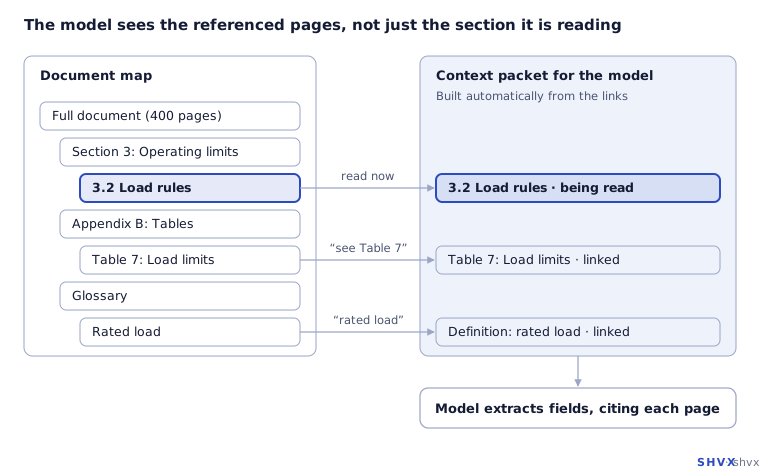
On the left is the document map. Section 3.2 mentions Table 7 and the term “rated load”, so both are pulled into the packet on the right before the model extracts anything.
Two practical tips. First, resolve references in a loop, because a table can itself point to another note. Set a limit, such as two hops, so the packet stays small. Second, keep a log of references the system could not resolve. A growing list usually means a parsing problem in step 2 or 3.
Running it at scale
- Work in batches. Put documents on a queue and process sections in parallel with several workers. Retry failed pieces, not whole documents.
- Use the right model for each job. Small, cheap models can classify pages and spot headings. Save the strongest model for the hard extraction.
- Cache what doesn’t change. If the same appendix appears in a hundred documents, process it once.
- Use batch pricing where your AI provider offers it, for work that doesn’t need an answer in seconds.
How to know it’s working
Build a golden set: 30 to 50 real documents where a person has already written down the correct answers. Run the pipeline on them after every change and measure, per field, how many values it got right, how many it missed, and how many it invented. Track these numbers over time. “It looks good” is not a measure.
Common mistakes
- Chunking by a fixed word count and cutting tables in half.
- Throwing away page numbers, so nobody can check an answer.
- Relying on one giant prompt with the whole document.
- No human review path, so wrong values flow straight into business systems.
How SHVX can help
Getting documents agent-ready is our core work: poor-quality scans, multi-language files, deep hierarchies, and very large batches. Our Agent-Ready Data team can run your hardest documents through this pipeline and show you field-level accuracy before you commit.
Learn more about Agent-Ready Data.
FAQ
Can’t I just use a model with a very large context window?
It helps, but accuracy on small details still drops in very long inputs, every request costs more, and you still need page-level citations. Structure first, then extract.
What is the difference between OCR and AI extraction?
OCR turns a page image into text. AI extraction reads that text and pulls out the specific facts you need into fields.
How accurate can this get?
It depends on document quality and how strict the fields are. Measure it on your own golden set rather than trusting a vendor’s headline number.
Do I need people in the loop?
Yes, for low-confidence results. Their corrections also become new test cases that make the system better over time.