AI Autocomplete for Domain-Specific Search and Forms
Autocomplete, the suggestions that appear as someone types, saves time on every search and every form field. In specialist domains it only works if the system knows your product names, codes and jargon. The practical way to get there is an AI agent that learns your terms in the background, while a fast, cheap index answers users as they type.
The short answer: don’t call a language model on every keystroke. Split the system in two. An offline ingestion agent loads your code and product lists, and extracts terms from your documents, with the synonyms and abbreviations users actually type. A lightweight serving layer answers each keystroke from a search index built on that schema, in milliseconds, showing each user only what they are allowed to see. A background learning loop re-ranks terms from what users actually pick. The design repeats across domains with per-domain configuration, not a rebuild.
An engineer searching for a spare part, a claims handler picking a billing code, a buyer typing a supplier name: each one types a few letters and expects the right answer to appear. General-purpose autocomplete has never seen your part numbers or your internal names, so it suggests the wrong thing or nothing at all. This guide explains how to build type-ahead that knows your domain, and how to repeat it for the next domain without starting over. It sits in our Agent-Ready Data work, because good suggestions depend on agent-ready data underneath.
Why does generic autocomplete fail on domain terms?
- It has never seen your vocabulary. Part numbers, internal product names, medical or legal codes and supplier names are not in everyday language.
- Users type shorthand. “PA” and “pre-approval” should both find “Prior Authorization”.
- Codes and names live side by side. Some users type the code, others the description. Both must find the same entry.
- Old names linger. Products get renamed and codes get replaced, but people keep typing what they learned first.
- A wrong suggestion is worse than none. In a form, a confidently suggested wrong code goes straight into your records.
Why not call an LLM on every keystroke?
It is the obvious first design, and it fails in daily use. Compare it with a two-stage design, where the AI works in the background and a search index answers users:
| Live LLM on every keystroke | Two-stage agent with a fast index | |
|---|---|---|
| Speed | A model call often takes a second or more, so suggestions arrive after the user has typed on | An in-memory index lookup takes milliseconds, so suggestions keep up with typing |
| Cost | Tokens spent on every character typed, by every user | AI cost is paid once per domain update; typing costs almost nothing |
| Adapting to a new domain | Through prompts, re-sent on every call | Through automated ingestion, kept current as sources change |
| Made-up suggestions | The model can invent a term or code that doesn’t exist | The index can only suggest terms that are in it; mistakes come from ingestion, where people can review them |
That last row matters most for forms. A two-stage system can still be wrong, if the ingestion agent extracts a bad synonym, but the mistake sits in one reviewable list rather than appearing live in front of a user.
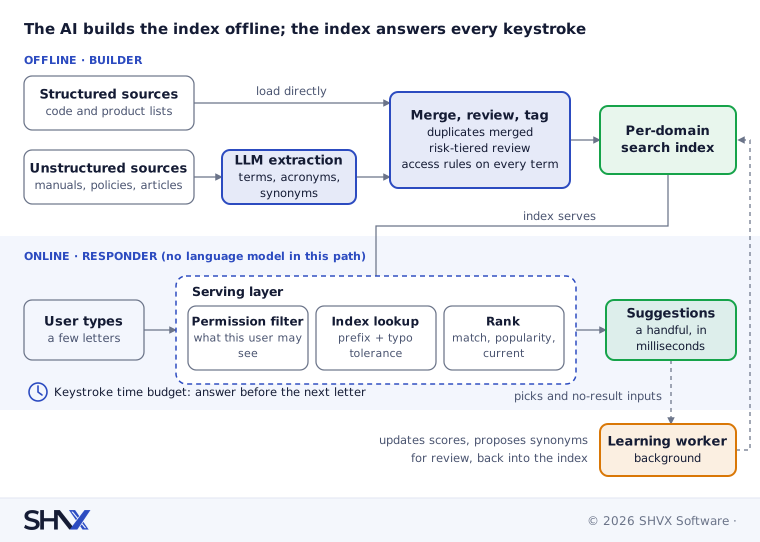
The two-stage architecture at a glance
- Stage 1, the builder (offline). An ingestion agent loads a domain’s structured lists directly, extracts terms, jargon and acronyms from its documents, proposes synonyms, and builds a search index.
- Stage 2, the responder (online). A lightweight service answers each keystroke from the index, with prefix matching, typo tolerance and a permission filter. No language model sits in this path.
- The learning loop (background). Clicks and searches that found nothing flow back, so popular terms rise and missing terms are found.
Stage 1: the ingestion agent builds the term list
The ingestion agent runs in the background whenever a domain is added or its sources change. How it treats a source depends on what kind of source it is.
Structured sources load directly. Product masters, code lists and supplier tables already hold the canonical names and codes, so they are loaded as they are. The language model only adds what the table lacks: likely synonyms, abbreviations and plain-language descriptions. Running a model over clean structured data adds cost and introduces errors that weren’t there before.
Unstructured sources go through extraction. Manuals, policies and knowledge-base articles are read by a language model that returns domain terms, acronyms and synonyms in a fixed structure, each linked to the page it came from. The reading pipeline is the one described in How to Extract Data from Large, Complex Documents with AI.
Every term ends up in the same shape. Whatever the source, each entry carries the text users see, the codes and variants that should find it, a category, whether it is current or retired (with a pointer to its replacement), where it came from, who may see it, and how popular it is. One shape across domains is what lets the serving layer stay the same. Duplicates are merged into one entry with all their variants, because duplicate entries become duplicate suggestions on screen.
Review by risk, not by volume
A language model can propose a wrong synonym as confidently as a right one, but no team can check hundreds of thousands of synonyms by hand. Tier the review:
- Full review for terms that drive records or money: billing codes, part numbers, form fields.
- Sampled review for the rest, starting with the terms used most.
- Automatic approval only for high-confidence proposals in low-risk categories, with every reviewer correction kept as a test case.
Then add the shorthand your experts hear every day, which no document may contain.
Keep it fresh
Product and code lists change daily, so a weekly rebuild leaves new items unfindable for days. Update structured sources as their records change, and re-run the language model only on new or changed items. Version each domain’s term list so a bad ingestion can be rolled back in one step, in the same way as the release bundle in DevOps for AI Agents.
Carry permissions with every term
Isolating one domain from another is not enough. Inside a domain, a suggestion can reveal that something exists even when the user can’t open it: a confidential project name, a customer, a deal code. Each term inherits access rules from its source, and every request is filtered by what that user may see. Our post Is It Safe to Connect AI to Your Email and Drive? explains why over-broad access is the first thing to fix in any AI rollout.
Stage 2: the serving layer answers every keystroke
A small, fast service answers each keystroke from the index, with no language model in the path. It routes the request to the right domain, checks what the user is allowed to see, matches the input with typo tolerance across names, codes and variants, ranks the results and returns a handful of suggestions. Where plain-language descriptions matter, the index can also support meaning search, the same idea as in our hybrid RAG guide, with prefix results as the fallback if that step runs slow.
Speed is a hard budget. Suggestions that arrive after the next letter are useless. Wait for a short pause in typing before each request, keep the index in memory and close to users, and drop requests that are out of date. Measure the slowest responses, not the average: a system that is slow for one user in twenty still feels broken to that user.
Ranking blends how well the input matches, what users pick most, the user’s context and whether a term is current. An exact code match always comes first.
Forms are stricter than search. In a form field, the user must pick a valid entry or say that none fits. Free text that merely looks like a code must never be saved as one.
The learning loop keeps it current
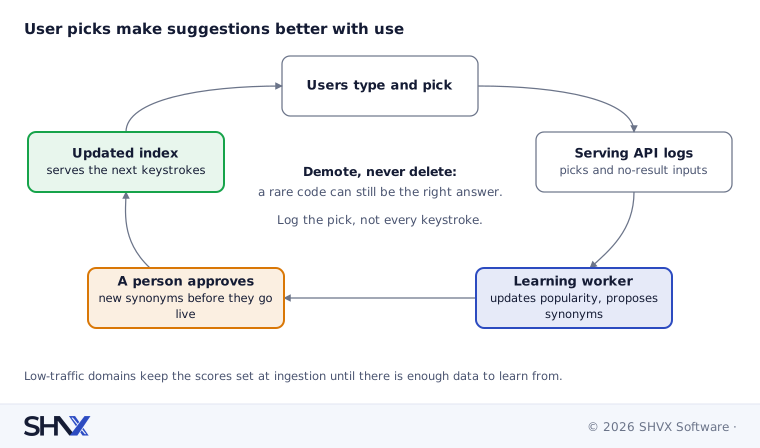
A background worker reads what users pick, and what they typed when nothing was found. It raises terms people choose, demotes terms they skip, and proposes missing synonyms for review. Demote, never delete: a rarely used code can still be the right answer for the person who needs it.
Three things to design around:
- Popularity bias. Users click what is shown first, so top terms collect clicks and stay on top. The loop has to account for where a suggestion appeared, not just whether it was clicked.
- Too little data. Low-traffic domains don’t generate enough clicks to learn from. They should keep the scores set at ingestion.
- Keystroke logs are personal data. Partial inputs in forms often contain names and ID numbers. Log the pick rather than every keystroke, mask what you keep, and keep it only briefly.
Repeating it for a new domain
The design repeats across domains, but it is not plug-and-play. Each new domain still needs its sources connected, its codes handled correctly (hyphens, leading zeros, “FL-304” versus “FL304”), its ranking tuned and its access rules mapped. Indian languages need script and transliteration handling, where typo tolerance in most search engines is weaker than for English. What carries over unchanged is the term shape, the serving layer, the review workflow and the learning loop, which is where most of the build effort sits.
Platforms at each stage
A first version needs fewer moving parts than you might expect. These are common choices, not the only ones:
| Stage | To start | At scale |
|---|---|---|
| Source connectors and ingestion | Python services that read lists and documents | A job queue such as Celery to run many sources and domains |
| Language model for extraction | A commercial or open-weight model, using batch pricing for large document sets | Small models on your own servers for simple, high-volume jobs |
| Search index | Typesense or Meilisearch, one collection per domain | Shared collections with tenant filters once domains run into the thousands |
| Serving layer | Python with FastAPI | A Redis cache for hot prefixes once traffic justifies it |
| Learning loop | A scheduled job over pick logs | A streaming pipeline with masked, short-lived logs |
How to measure it
The best measure is simple: do people pick what you suggest? Track, per domain:
| Metric | Plain meaning |
|---|---|
| Acceptance rate | Share of searches or fields where the user picked a suggestion |
| Position of the pick | How far down the list the chosen item was; first place is the goal |
| Keystrokes saved | Letters typed before the pick, compared with the full term |
| No-result rate | Inputs that produced no suggestion; each one is a gap in the term list |
| Wrong-pick corrections | Picks the user changed straight after, a sign of misleading suggestions |
| Slowest responses | Response time for the slowest one in twenty requests |
| Extraction quality | Share of ingested terms and synonyms that reviewers approved unchanged |
Keep a fixed set of real inputs per domain and re-run it after every ingestion, ranking change or model change, so an improvement in one place doesn’t break another.
Common mistakes
- Calling a language model on every keystroke.
- Running LLM extraction over clean structured lists.
- Trying to review every synonym by hand, or reviewing none.
- Isolating domains but not filtering terms by what each user may see.
- Rebuilding weekly for data that changes daily.
- Trusting click counts without allowing for where a suggestion was shown.
- Logging every keystroke typed into forms.
- Deleting rarely picked terms instead of demoting them.
How SHVX can help
Users can’t find the right product or code as they type? Send us your product or code list. We’ll check how ready it is for autocomplete: duplicates, missing synonyms, retired codes and gaps, with a short list of fixes.
Learn more about Agent-Ready Data.
FAQ
Does AI autocomplete need a language model on every keystroke?
No. The model works offline to build the term list. Each keystroke is answered from a fast search index.
Can it make up suggestions?
The serving layer can only suggest terms in the index. Errors can enter during ingestion, which is why new terms and synonyms are reviewed before they go live.
How do we add a new domain?
Connect its sources, load or extract its terms, review them by risk, and give it its own collection with its access rules. The serving layer and learning loop stay the same; code handling and ranking need tuning per domain.
Can it work inside forms, not just search?
Yes. Field-level autocomplete for codes, suppliers or products is often where it saves the most time and prevents the most errors.