AI Notes for In-Person Meetings That Track Follow-Ups
The short answer: use the phone or laptop already in the room, with the client’s consent, to capture the conversation. An AI agent then turns it into a short summary and, more importantly, a list of follow-ups: who promised what, by when, each linked to the moment it was said. You review the list in two minutes and push it into your CRM. Promises stop slipping through the gaps between meetings.
Video calls now come with AI notes built in. Face-to-face meetings, where advisors, relationship managers and consultants often have their most important conversations, still rely on memory and a notebook. This guide explains how to close that gap. It draws on our Agent Engineering work, where we build agents that turn conversations and documents into tracked actions.
The real problem is what happens after the meeting
Most people can remember the gist of a meeting. What gets lost are the small commitments:
- “I’ll send you the revised proposal by Thursday.”
- “Can you share last year’s statements?”
- “Let’s check in again after the board meeting.”
Each one is a promise, from you or from the client. Miss a few and trust erodes. Track them well and you look organised, responsive and worth working with. The value of AI notes is not the transcript. It is the follow-up list.
How it works
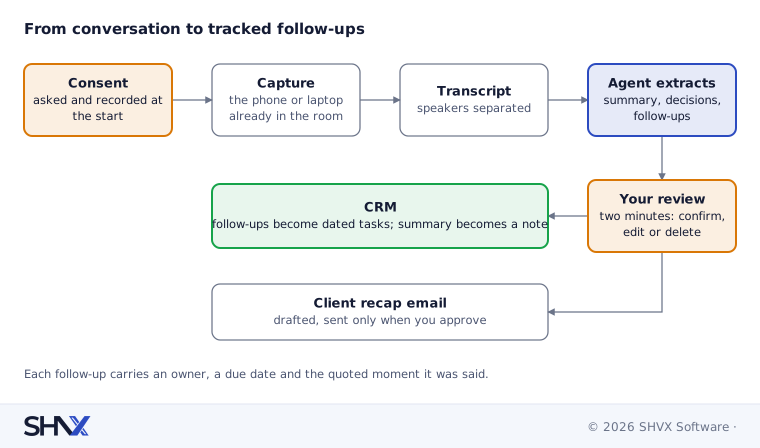
- Ask for consent, and record it. Start by asking the client if you can capture the conversation for notes. Capture their answer at the start of the recording.
- Capture on the device you already carry. A phone on the table or a laptop is enough for a meeting room. No extra hardware.
- Transcribe and separate speakers. The agent knows who said what, which matters for who owns each promise.
- Extract what matters. A short summary, the decisions made, and every follow-up with an owner, a due date and a link to the exact moment it was said.
- Review in two minutes. You confirm, edit or delete items before anything is saved or sent.
- Push to the CRM. Approved follow-ups become tasks with due dates; the summary becomes a meeting note on the client record.
If recording isn’t appropriate, the same agent works from a two-minute voice memo you dictate on the way out of the building.
Follow-ups linked to what was said
A follow-up without context is easy to ignore. Each item the agent creates carries:
| Field | Example |
|---|---|
| Action | Send revised proposal with the two pricing options |
| Owner | You (or the client, for their promises) |
| Due | Thursday, as stated in the meeting |
| Evidence | The quoted line and its timestamp |
| Status | Open, done or waiting on client |
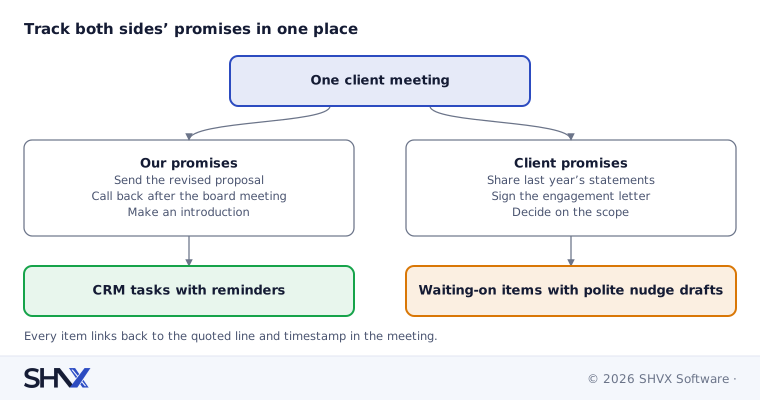
The evidence link settles “did I really say that?” in seconds. It also lets the agent remind you of the client’s promises, not just your own, so you can nudge politely when their documents haven’t arrived.
It is the same idea behind our compliance work: turning the words in a document or a conversation into owned, tracked tasks with evidence.
Privacy of client conversations
Client meetings carry sensitive information, so the design matters as much as the AI:
- Consent first. Recording rules differ by country and state; some require every participant’s consent. Ask every time, and respect a no.
- Keep audio short-lived. Delete the recording once the transcript is approved, unless you have a reason and a policy to keep it.
- Control where data goes. Process audio and transcripts with approved providers whose terms rule out training on your data, in the region you need.
- Mask what you don’t need. Account numbers and personal identifiers can be masked in the notes.
- Limit access. Notes should follow the same access rules as the client record in your CRM.
For regulated advisors, check your record-keeping rules too. Some require you to keep records of client advice, which makes accurate, reviewed notes an advantage rather than a risk.
Common mistakes
- Recording without asking.
- Saving full transcripts nobody reads, with no follow-up list.
- Letting the agent email clients without your review.
- Keeping audio forever “just in case”.
- Rolling out to everyone before one team has tested it.
How SHVX can help
Promises from client meetings slipping through the gaps? Try it with one team for two weeks. We’ll set it up on the devices they already use and review the results with you.
Learn more about Agent Engineering.
FAQ
Do I need special recording hardware?
No. A phone or laptop in the room is enough for most meetings.
Is it legal to record client meetings?
It depends on where you are. Some places require every participant’s consent. Always ask, and record the client’s answer.
Will it update our CRM automatically?
Only after you approve the follow-ups. Nothing is saved or sent without your review.
What if the client says no to recording?
Dictate a two-minute voice memo after the meeting. The agent builds the same follow-up list from it.