AWS vs Azure vs Google Cloud for AI Agents: How to Choose
The short answer: AWS, Azure and Google Cloud now all offer a complete managed platform for AI agents, so the platform itself rarely decides. Build where the data your agent needs already lives and where your users already sign in. Then check three things: the models you need are offered there, in the regions your data must stay in, and your team can run it.
Founders ask us this in almost every first meeting. Two years ago the answer depended on which cloud had the best AI tools. Today the three have caught up with each other, and choosing on features alone leads to expensive data moves and duplicate security work later. Our Agent Engineering team builds on all three; this guide shows how we help clients choose.
Three words explained
- Managed agent platform: a cloud service that runs your agent for you, with built-in memory, tool connections, security and monitoring.
- Identity: how people and agents prove who they are, and what they are allowed to do. Most companies use Microsoft Entra ID, Google or another single sign-on.
- Region: the country or area where the cloud stores and processes your data.
What AI agent platforms do AWS, Azure and Google Cloud offer?
AWS offers Amazon Bedrock AgentCore, Azure offers Microsoft Foundry Agent Service, and Google Cloud offers the Gemini Enterprise Agent Platform. Each cloud renamed or rebuilt its agent tools during 2025–26. In April 2026 Google rebranded Vertex AI as the Gemini Enterprise Agent Platform, so many comparison articles online now use names that no longer exist. A side-by-side review of the three platforms finds they now cover the same ground: runtime, memory, tool access, identity and tracing.
| Amazon Web Services | Microsoft Azure | Google Cloud | |
|---|---|---|---|
| Agent platform | Amazon Bedrock AgentCore | Microsoft Foundry Agent Service | Gemini Enterprise Agent Platform |
| Its style | Separate building blocks you adopt one at a time | Agents get their own Microsoft identity and can appear in Teams and Microsoft 365 | Close to BigQuery data, with Google’s own agent toolkit |
| Strongest when | Your apps and data already run on AWS | Your staff live in Microsoft 365 and Entra ID | Your data sits in BigQuery or Google Workspace |
| Watch out for | Many separately billed parts | Fast-changing product names and features | Recent renames: check what is generally available |
Model choice matters less than it used to. Each cloud offers its own models first (Amazon Nova on AWS, OpenAI’s models on Azure, Gemini on Google), and many others, including Anthropic’s Claude, are sold on more than one cloud. Check the exact model and region before you commit; see Commercial vs Open-Source LLMs for how to test models on your own tasks.
How do you choose a cloud for AI agents?
Choose the cloud where the agent’s data and users already are, then check models, regions, team skills and existing commitments:
- Where does the data the agent needs live? Moving data between clouds costs money on every transfer, adds delay and doubles the security review. Data location is usually the deciding question.
- Who will use the agent, and where do they sign in? An agent for staff on Microsoft 365 is far simpler on Azure. An agent for customers depends more on where your app runs.
- Which models must you use? List the two or three you have tested, and confirm each is offered in your chosen cloud.
- Where must data stay? Check that the models and agent services you need are available in your required regions, not just in the US.
- What does your team already know? A team fluent in one cloud ships faster and makes fewer security mistakes there.
- What commitments do you already have? Existing discounts, startup credits and approved vendor status all change the real price.
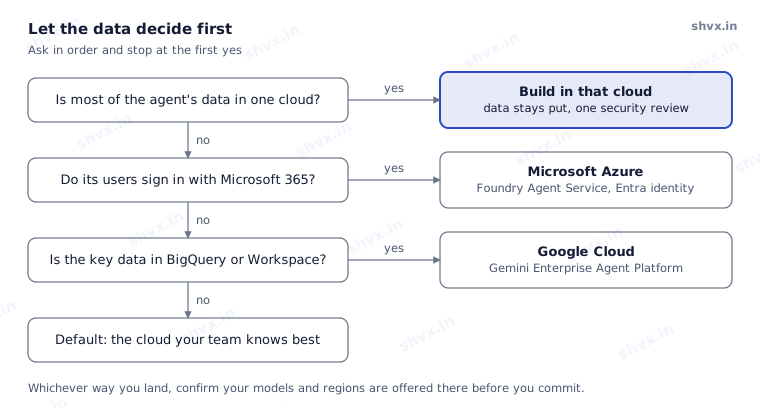
Data comes first because it is the most expensive thing to move. Identity comes second because a second sign-in system doubles your security work. Only when neither decides does your team’s experience settle it.
What does choosing the wrong cloud cost?
The wrong cloud for an AI agent rarely fails on day one. It shows up later as data-transfer fees on every request, a second identity system to manage, a separate security approval, and engineers learning a new platform under deadline. Running costs matter too; What Does It Cost to Run an AI Agent in the Cloud? breaks down the monthly bill line by line.
How do you avoid cloud lock-in for AI agents?
To avoid cloud lock-in, keep the parts that make your agent yours outside any one platform, so a move later is a project, not a rewrite.
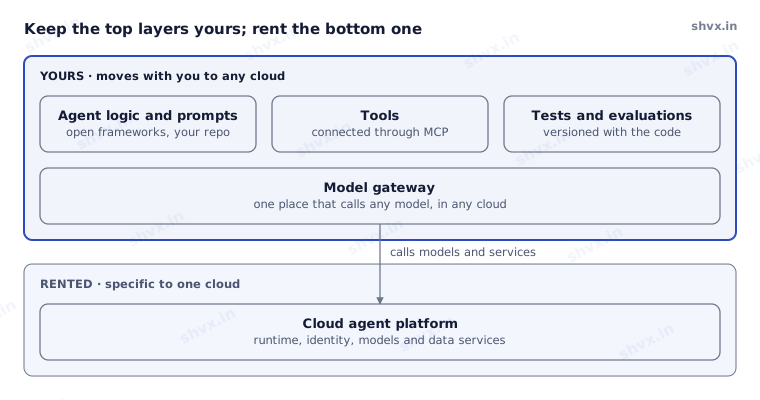
Everything in the top box travels with you. Only the bottom layer is specific to one cloud, and the gateway is the single seam between them, which is why a later move is a contained project.
- Put a thin model gateway in front of every model call, so switching models or clouds is a settings change.
- Use open frameworks for agent logic where you can, rather than a cloud’s proprietary designer.
- Connect tools through an open standard such as the Model Context Protocol (MCP), so tools work with any agent.
- Keep prompts, test sets and evaluation results in your own repository, versioned with the code.
Do you need more than one cloud?
For a first agent, almost never. Pick one and get it into production. Multi-cloud makes sense later, when different agents need data in different clouds, or a regulator or customer contract requires a second provider.
Common mistakes
- Choosing the cloud with the most impressive demo instead of the one holding your data.
- Ignoring where users sign in, then building a second identity system.
- Assuming a model is available in your region because it is available in the US.
- Building all agent logic in one cloud’s visual designer with no way out.
How SHVX can help
Choosing a cloud for your first agent shapes your costs and speed for years. Our Agent Engineering team reviews your data, users, models and team, then gives you a written recommendation and a reference architecture you can build on.
Learn more about Agent Engineering.
FAQ
Which cloud is best for AI agents?
None in general. The best one is usually where your data and users already are.
Is Google Vertex AI still available?
It has been renamed and expanded as the Gemini Enterprise Agent Platform; Google says existing services continue under the new platform.
Can I use Claude or GPT on any cloud?
Many models are offered on more than one cloud, but not every model in every region. Check before you design around one.
Can I switch clouds later?
Yes, if you keep agent logic, prompts, tools and tests outside the cloud’s own designer and call models through a gateway.
Platform names and features checked in November 2026. All three clouds change their agent services often; re-check every quarter.