How to Use Claude for Solution Design and Documentation
Turning an idea into a solution design used to take weeks of workshops and drafts. With an AI assistant such as Claude, an experienced architect can get to a reviewed design and clear documentation much sooner. The judgement still has to come from a person; the AI speeds up the thinking and the writing.
The short answer: use Claude as a thinking partner and a fast writer, not as the architect. Give it a complete context pack, ask for options with trade-offs rather than one answer, have it draw diagrams as code and record each decision, then ask it to attack its own design. A human architect signs off every decision. Our Agent Engineering team works this way on every engagement.
Why does AI-assisted design go wrong?
Most disappointing results come from the same three habits:
- Too little context. “Design a customer portal” gets a generic textbook answer.
- Asking for the answer. One confident design hides the trade-offs you needed to see.
- No review. AI-generated designs read well. That makes gaps easy to miss.
The playbook below fixes all three.
How do you use Claude for solution design, step by step?
Follow six steps: build a context pack, ask for options, draw diagrams as code, record each decision, make Claude attack the design, and have a person sign off.
1. Build a context pack. Before asking anything, collect what a new architect on the project would need: the business goal, users and volumes, must-have rules (data location, compliance, budget), the existing systems and tech stack, and what is out of scope. Keep it in one place, such as a Claude Project, so every conversation starts from the same facts.
2. Ask for options, not an answer. Ask for two or three designs, each with its cost, risk, effort and what would make it the wrong choice. Options force the trade-offs into the open, where you can judge them.
3. Draw diagrams as code. Ask for architecture and flow diagrams in a text format such as Mermaid. Text diagrams are easy to edit, sit in version control next to the design, and stay in step with it.
4. Record each decision. For every significant choice, have Claude draft a short architecture decision record (ADR): the context, the options considered, the decision and its consequences. A year later, nobody has to guess why the system looks the way it does.
5. Make it attack the design. Start a fresh conversation, give it the design, and ask it to act as a demanding reviewer: find single points of failure, security gaps, cost risks and missing requirements. A fresh conversation matters, because the model is less attached to work it didn’t just write.
6. A person signs off. The architect checks every claim, especially product features, limits and prices, which change often. Claude drafts; the architect decides.
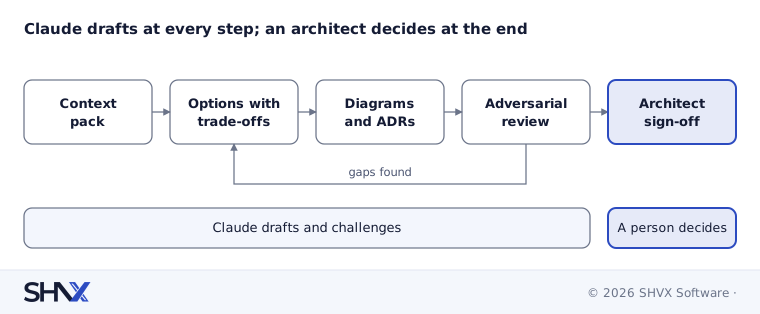
Claude speeds up the first four steps; gaps found in review loop back to the options, and only a person signs off.
How can Claude help with documentation people actually read?
Claude is at its most useful on the writing that architects tend to leave until last:
- One design, several readers. From the same design, produce a one-page summary for the board, a technical design for engineers, and a runbook for the operations team.
- Consistent structure. Give it your template once; every document follows it.
- Plain language. Ask it to explain every technical term the first time it appears, and to keep sentences short.
- Living documents. When the design changes, ask for an update of the affected sections only, so readers can see what changed.
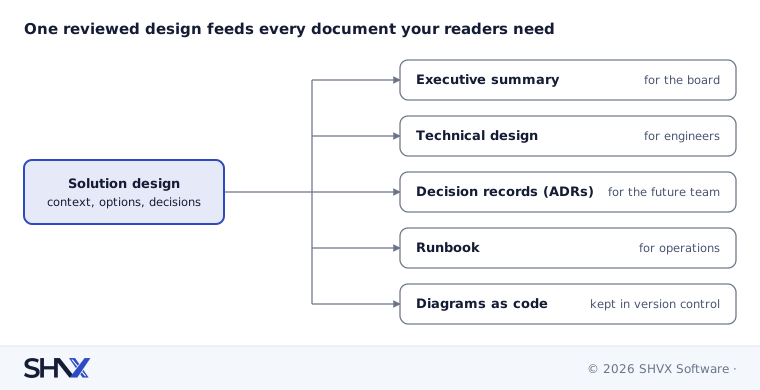
Every document comes from the same design, so when the design changes, they can all be updated together.
What guardrails keep AI-assisted design safe?
- Check facts against the source. Product features, limits and prices go out of date. Verify them in the vendor’s documentation before they go into a design.
- Mind the data. Don’t paste client secrets, personal data or credentials into any AI tool unless your agreement and policies allow it.
- Keep a human name on every decision. Accountability for a design can’t be delegated to a model.
Once the design is built, the prompts inside your agents need the same discipline (see Prompt Engineering for Production AI Agents).
Common mistakes
- Asking for a design in one line and accepting the first answer.
- Letting the AI pick the technology because it sounded confident.
- Skipping the review step because the document reads well.
- Keeping diagrams as images that nobody can update.
How SHVX can help
Whether you are a business founder with an idea or a technical team that needs a second pair of eyes, our Agent Engineering team turns ideas into reviewed solution designs, with options, costs and documentation your team can use.
Learn more about Agent Engineering.
FAQ
Can Claude design a software solution on its own?
It can draft one, quickly. A good design still needs an experienced architect to supply context, judge trade-offs and check facts.
What should I give Claude before asking for a design?
Goals, users and volumes, constraints, existing systems, and what is out of scope. The more complete the context, the less generic the design.
What is an ADR?
An architecture decision record: a short note of one design decision, the options considered and why one was chosen.
Is it safe to share project details with an AI assistant?
Check your agreements and company policy first, and never share secrets, credentials or personal data without approval.