KYC Document Verification with AI: Checks That Hold Up
reading KYC documents is the easy part. The value is in the checks: does the same person appear on every document, are the numbers valid, and is anything edited or missing? A good pipeline runs these checks on every file and shows reviewers only what fails.
The short answer: verify KYC documents in layers. Classify each page, extract fields with a page citation, validate each field on its own (formats, check digits, dates), then cross-check fields across documents. Add tamper signals as review triggers, combine everything into one confidence score per file, route unclear files to a reviewer, and mask ID numbers everywhere outside the record itself. Measure accuracy per field on your own worst files.
This is the technical companion to KYC Automation with AI, and it follows the same structure-first approach as our Agent-Ready Data work.
Step 1: Classify every page
A customer file is a pile of pages in no fixed order. Sort each page into a document type: application form, identity proof, address proof, income document, bank statement or “other”. Small, low-cost models handle this well. Keep the page order and number, and flag files where a required document type is missing, so the customer can be asked on day one.
Step 2: Extract fields with citations
For each document type, define a fixed list of fields: full name, date of birth, ID number, issue and expiry dates, address, employer, income. Extract each with:
- the value as written and a normalised version (dates in one format, names in consistent case);
- the page and region it came from;
- the model’s confidence.
Handwritten application forms need field-by-field reading, as described in extracting data from handwritten forms.
Step 3: Validate each field on its own
Plain rules catch many errors before any cross-check:
- Formats: an ID number has the right length and pattern for its document type.
- Check digits: many ID numbers include one, and passports carry them in the machine-readable zone. Recompute them; a mismatch means a misread or an altered number.
- Dates: real dates, an issue date before the expiry date, and the document still valid on the application date.
- Reference lists: postcodes, cities and country codes that exist.
Step 4: Cross-check across documents
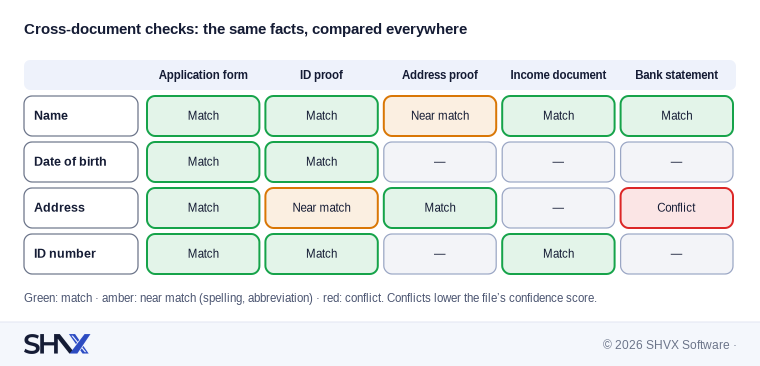
The same person must appear on every document. Compare names, dates of birth, addresses and ID numbers across documents, using fuzzy matching for names and addresses: initials, transliteration and abbreviations are common and usually harmless. Treat a different date of birth or ID number as a hard conflict. Where income documents and bank statements are both present, check that salary credits match the employer and amount on the payslip.
Step 5: Flag tamper signals as review triggers
Flag, with evidence, for a person to review:
- fonts, spacing or alignment that differ from the rest of the page;
- digital PDFs edited after creation, or with unusual software metadata;
- photos of screens instead of documents;
- details that are valid alone but contradict another document.
These are signals, not verdicts. Deciding whether something is fraud stays with trained people. Liveness and face matching are separate, specialised checks, usually from a dedicated provider whose result feeds into the same file.
Step 6: Score, route and protect
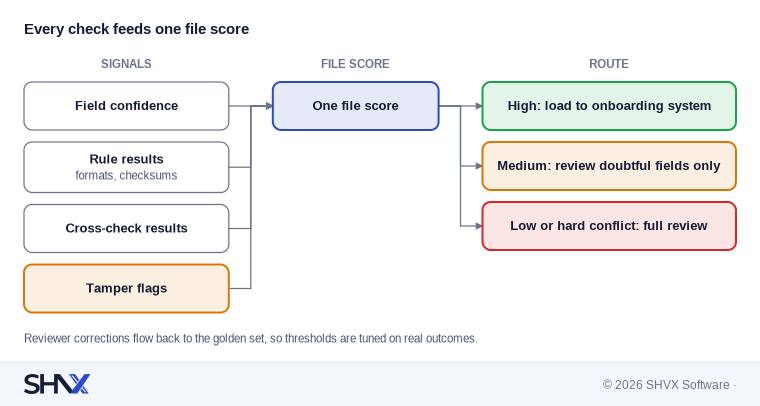
Combine every result into one score per file and route it:
- Confident files load straight to the onboarding system.
- Unclear files go to a reviewer who sees only the doubtful fields, with the page image beside each value.
- Hard conflicts always go to full review.
Protect the data as you go: mask ID numbers in logs, prompts and dashboards; keep documents in your environment; use approved models only; and keep an audit trail of every read, flag and decision.
How do you measure it?
Build a golden set of real files per product, including your worst scans, with values checked by your compliance team. Track per field: accuracy, missed values, invented values, review rate and how often auto-passed files were in fact correct. Re-run the set after every model, prompt or rule change. Our guide to testing AI agents shows how to automate this.
Common mistakes
- Exact-matching names across documents, so harmless spelling differences flood reviewers.
- Treating tamper signals as proof of fraud.
- Logging full ID numbers.
- One confidence threshold for every field.
- Testing on clean samples only.
How SHVX can help
Building or fixing KYC document checks? Send a few of the document types you verify. We’ll run a sample extraction with the cross-checks and show you field-level accuracy. Lenders can also see our lending page.
Learn more about Agent-Ready Data.
FAQ
What is KYC document verification?
Checking that onboarding documents are complete, valid, consistent with each other and unaltered, before a customer is accepted.
Can AI detect fake ID documents?
It can flag signals worth a closer look, such as edited fonts, invalid check digits or conflicting details. Final decisions stay with trained people and specialist identity checks.
How do you verify KYC documents automatically?
Classify each page, extract fields with citations, validate formats and check digits, cross-check details across documents, then route unclear files to a reviewer.
Is liveness checking part of document verification?
No. Liveness and face matching are separate checks, usually from a dedicated provider, whose results join the same file.