No GPU, No Cloud Bill: An AI Agent That Runs on a Laptop
A useful company AI agent no longer needs a big AI model or an open-ended cloud bill. We ran one on an everyday office laptop. If it runs there, it runs on a cloud server for a fixed monthly cost you can put in a budget.
The short answer: small language models are now good enough for many everyday business AI agents. Our Agent Engineering team ran a conversational AI agent on IBM’s Granite 4.2 3B model, on a 16 GB Windows laptop with no dedicated graphics card. The point is not to run your business from a laptop. The point is feasibility: the same setup moves to a cloud server that costs about $150 to $300 a month, every month, however many questions your users ask.
Every founder we speak to asks the same thing about AI: what will it cost? With commercial AI models, the honest answer is “it depends”. You pay for every word read and written, so the bill moves with usage. Small models change that conversation, starting with conversational AI agents, what used to be called chatbots.
What is a small language model?
A small language model (SLM) is an AI model with a few billion parameters, small enough to run on an ordinary computer. A parameter is one of the numbers the model learned in training; more parameters usually means more knowledge, and more hardware to run it. The large commercial models have far more.
Small models are not as broad or as clever as the largest ones. But most business AI agents don’t need broad knowledge. They need to answer questions about your policies, products and processes, using your documents. That is a much narrower job.
Can a 3B model run a business AI agent on a laptop?
Yes, for focused jobs. We chose Granite 4.2 3B, released by IBM in August 2026. It is open-weight under the Apache 2.0 licence, which allows commercial use, and it supports tool calling and long documents. Granite was our pick for this use case; the same setup works with any open-weight small model that fits the hardware. We ran it on a standard business laptop:
| Part | What we used |
|---|---|
| Processor | 11th-gen Intel Core i5 (i5-1145G7) |
| Memory | 16 GB RAM |
| Graphics | Intel Iris Xe, built into the processor, no dedicated GPU |
| Operating system | Windows |
| Model | Granite 4.2 3B, open-weight |
It worked well as a conversational business AI agent, with no cloud service and no per-use charges.
What does a laptop-sized AI agent do well?
Small models suit focused jobs where the answer lives in your own documents:
- Internal help desk: HR policies, leave rules, IT how-tos, expense rules.
- Front-desk or kiosk assistant: opening hours, services, directions, simple forms.
- Field-team assistant: product specs and procedures on a device that works offline.
- Draft replies for a person to approve: customer emails and support tickets, checked before they go out.
They are a weaker fit for open-ended research, hard multi-step reasoning, or questions that need knowledge of the whole world.
What do you need to run an AI agent on a laptop?
You need five things: a local model runtime, a small open-weight model, your documents with a search index, a chat screen, and basic guardrails with logs. This is the high-level shape, not a step-by-step guide.
- A local model runtime. Software that loads the model and answers requests on your machine. Several free options run on Windows.
- The model. A compressed (quantised) version of a small open-weight model, a download of a few gigabytes.
- Your knowledge. Your documents, cleaned and split into sections, with a small search index so the agent answers from them.
- A chat screen. A simple web page or an existing chat tool.
- Basic guardrails and logs. Rules for what the agent may answer, and a record of each conversation so you can check quality.
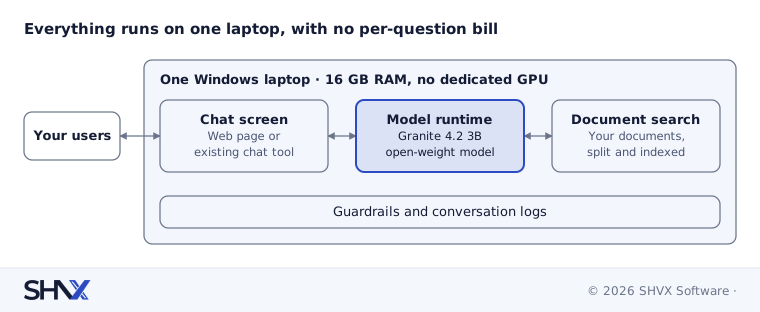
The chat screen, the model and the document search all sit on one laptop, so nothing is paid per question.
What does it cost to move from laptop to cloud?
A laptop proves the idea. For real users you move the same setup to a cloud server, and the server has a fixed price. Here is what comparable servers cost on Amazon Web Services (AWS) as of November 2026:
| AWS server | Spec | Pay as you go, per month | One-year commitment, per month |
|---|---|---|---|
| m7i.2xlarge, CPU only | 8 vCPU, 32 GB | about $294 | about $206 |
| g4dn.xlarge, with an NVIDIA T4 GPU | 4 vCPU, 16 GB, 1 GPU | about $384 | about $264 |
Prices are for the server only, in the US East region, from public price lists (m7i.2xlarge, g4dn.xlarge); storage and data transfer are extra. Check the AWS Pricing Calculator for your region before you budget.
The number that matters is not the price. It is that the price doesn’t move. A thousand questions or fifty thousand, the server costs the same. Compare that with per-token pricing, where a busy month, a longer document or a chatty user raises the bill.
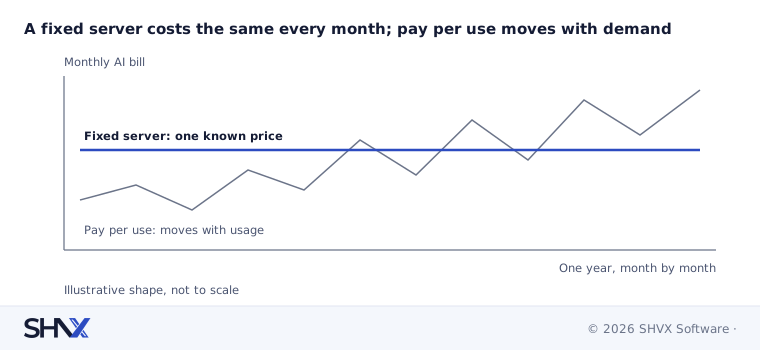
The flat line is a budget line you can approve once; the other one is a forecast.
When is one machine not enough?
A single server is a starting point, not the finish line. Plan for more when you need:
- many users asking questions at the same time
- an uptime promise to customers, which means at least two servers
- audit trails, access control and data rules for a regulated business
- several languages, sites or channels
This is where an architect earns their fee: choosing the right model size, server and setup so the cost stays fixed as you grow.
Common mistakes
- Picking a model from benchmark charts instead of testing it on your own questions.
- Skipping the document work. A small model is only as good as the knowledge you give it.
- Assuming “open-source” means “free to use any way you like”. Read each model’s licence.
- Treating a laptop demo as a production system.
How SHVX can help
Want an AI agent with a cost you can budget? Our Agent Engineering team runs a small-model fit check on your own documents and questions: a quality comparison against a commercial model, the right server size, and a fixed monthly cost.
Learn more about Agent Engineering.
FAQ
Can a small language model really run a business AI agent?
For focused jobs that answer from your own documents, often yes. Test it on 30 to 50 of your real questions before you decide.
Do I need a GPU?
Not to prove the idea. We ran our test on a laptop with no dedicated GPU. A GPU server helps when more people use the agent at once.
What does it cost to run in the cloud?
A comparable AWS server costs roughly $150 to $300 a month, fixed, depending on size, region and commitment.
Is my data safer on my own server?
Your data stays on infrastructure you control, which helps with privacy rules. Security still depends on access controls, encryption and monitoring.
Server prices checked against public AWS price lists in November 2026. Cloud prices change often; re-check before you budget.