How to Connect AI Agents to Legacy Systems That Have No API
You don’t need to replace an old system before an AI agent can use it. There is almost always a way in, from a database view to a bot that works the screen. The real work is making that connection reliable and safe to write to. Budget for it: integration, not the AI, is often the longest part of the project.
The short answer: don’t rebuild the old system first. For AI agent legacy system integration, use the most reliable way in that already exists: an API if there is one, then a read-only database view, then files and message queues, then email and forms, and screen automation only as a last resort. Wrap each connection in a narrow tool, read freely but write carefully (validate, stage, approve, read back), and test everything against a copy of the system.
Most businesses run on systems built long before AI agents: core banking platforms, ERPs, policy admin systems, in-house tools from a decade ago. Gartner’s warning on agentic AI projects points to the real cost and complexity of deploying agents at scale, and connecting them to legacy systems is a large part of that. Our Agent Engineering team connects agents to these systems without a rebuild.
Five words explained
- Legacy system: an older system the business depends on, often hard to change.
- API: a built-in way for software to talk to a system directly.
- Database view: a read-only window onto selected data in a system’s database.
- Screen automation: software that clicks and types on screens like a person.
- Adapter: a small piece of code that translates between the agent’s simple tools and the old system.
How can an AI agent connect to a system with no API?
An AI agent can reach a system with no API through a read-only database view, file exports or message queues, email and forms, or, as a last resort, screen automation.
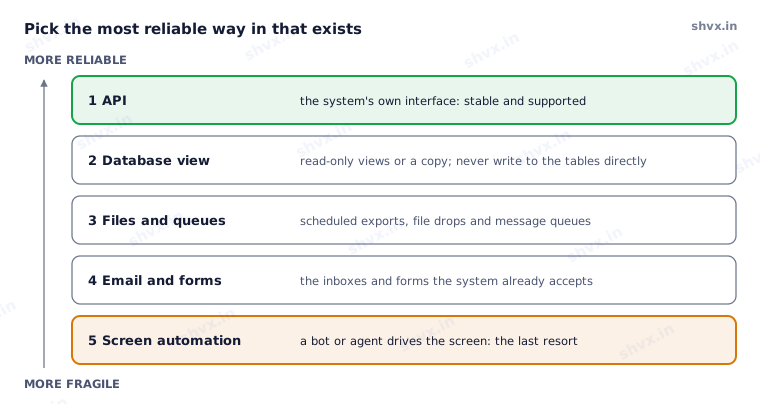
Move down the list only when the option above doesn’t exist. The further down you go, the more checks each connection needs.
| Way in | When it fits | Watch out for |
|---|---|---|
| API | The system, or a newer layer around it, offers one | Rate limits and older API versions |
| Database view | You need to read data and the vendor allows database access | Never write straight to tables; it bypasses the system’s own rules |
| Files and queues | The system already exports files or uses a message queue | Delays between exports; check the file before using it |
| Email and forms | The system takes requests by email or web form | Confirm each request was actually processed |
| Screen automation | Nothing else exists | Breaks when screens change; slower; needs strong checks |
Computer-use agents, AI models that can operate a screen themselves, make the last option more flexible than old software robots. Computer-use agents are still the most fragile choice: use them for reading or low-risk steps first, and plan to replace them if a better way in appears.
What is the adapter pattern for AI agents?
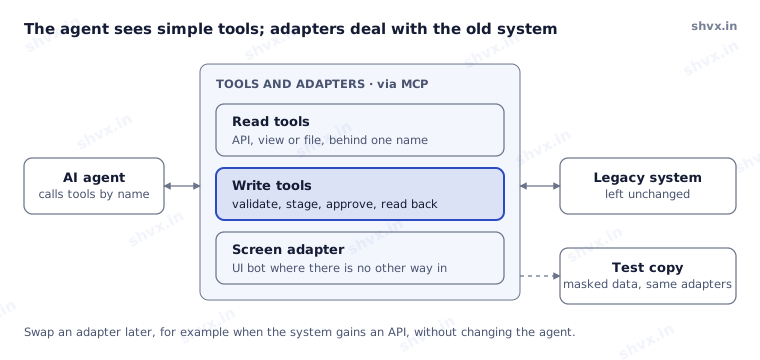
In the adapter pattern, the agent never sees the old system. It sees a few simple tools such as “get customer” or “create claim note”, offered through an open standard such as the Model Context Protocol (MCP). Behind each tool, an adapter does the translation. Adapters keep the agent simple, keeps permissions narrow, and lets you swap an adapter later without touching the agent; AI agent permissions covers how to scope each tool.
How can an AI agent write to a legacy system safely?
Reading from a legacy system is low risk. Writing to it is where things go wrong. Every write tool should:
- Validate the request against the system’s rules before sending it.
- Be safe to repeat: sending the same request twice must not create two records.
- Stage risky changes and wait for a person’s approval; see human in the loop AI.
- Read back after writing to confirm the change actually landed.
- Respect limits, such as batch sizes and the hours when the old system can take load.
How do you test a legacy system integration safely?
Test legacy integrations against a copy: never let an agent learn on the live system. Run the same adapters against a test copy with masked data, try the edge cases (locked records, timeouts, screens that change), and only then connect production. Treat adapters as part of the agent’s release bundle, versioned and tested with every change; see DevOps for AI agents.
Common mistakes
- Planning a full system replacement before automating anything.
- Writing directly to database tables and bypassing the system’s own checks.
- Choosing screen automation when a file export already exists.
- Giving the agent the old system’s admin login.
- Leaving integration until after the AI is “done”.
How SHVX can help
If your most valuable process runs through a system nobody wants to touch, that is usually the best place to start. Our Agent Engineering team builds adapters and narrow tools for legacy systems, tests them on a copy, and connects them to your agents safely.
Learn more about Agent Engineering.
FAQ
Can AI agents work with legacy systems that have no API?
Yes. Database views, file exports, email and screen automation all work, if each is wrapped in a narrow, tested tool.
Do AI agents replace screen automation?
Partly. Agents handle the judgement and the exceptions; a screen bot may still be the only way into some old systems.
What is MCP and does it help?
The Model Context Protocol is an open standard for offering tools to AI agents. It gives every adapter the same shape, so agents can use them consistently.
How do we keep the old system safe?
Read through views or copies, write only through validated tools, require approval for risky changes, and test on a copy first.
Checked in November 2026.