How to Connect AI Agents to Business Systems with MCP
MCP (Model Context Protocol) is a common standard for connecting AI agents to the systems you already run. It means you build a connection once and any compatible agent can use it. The real work is deciding what each agent may do through that connection, and proving it can’t do more.
The short answer: to connect an AI agent to a business system with MCP, put an MCP server in front of the system’s API. The server offers the agent a short list of narrow tools, such as “look up an order” or “draft a credit note”, each with its own permissions. Use an existing server when a trusted one exists, build your own when you need tighter control, keep risky actions behind a person’s approval, and log and test every tool call.
Most businesses already have the systems an agent needs: a CRM, an ERP, a ticketing tool, a database. Until recently, every agent needed its own custom connector to each one. MCP replaces that with one standard. This guide explains how to use MCP for AI agents safely. It sits in our Agent Engineering work. If your system has no API at all, start with connecting AI agents to legacy systems.
What is an MCP server, in plain words?
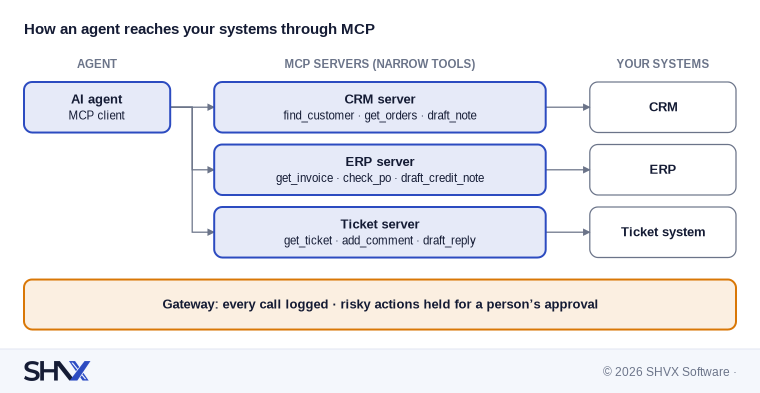
Think of an MCP server as a receptionist between the agent and your system. The agent asks, “What can you do?” The server answers with a list of tools, each with a name, a description and the inputs it needs. The agent picks a tool, the server checks the request, calls your system and returns the result.
Three terms help:
- MCP client: the agent side, built into the agent platform or app.
- MCP server: the connector in front of one system, which you run or a vendor provides.
- Tool: one action the server offers, such as
get_invoiceorcreate_draft_reply.
The protocol is maintained as an open project under the Linux Foundation’s Agentic AI Foundation. Its latest revision, 2026-07-28, made the protocol stateless so it runs on ordinary web infrastructure, and tightened how it handles sign-in through OAuth.
Should you use an existing MCP server or build your own?
Many software vendors now publish MCP servers for their products, and open-source servers exist for common databases and tools. Use one when:
- it comes from the vendor or a source you trust;
- its tools are narrow enough for your agent’s job;
- you can switch off the tools you don’t need.
Build your own when the ready-made server exposes far more than the job needs, when you must enforce your own business rules (approval limits, field masking), or when the system is internal. A small custom server that offers five well-designed tools is often safer and more reliable than a general one that offers fifty.
How do you keep permissions tight?
MCP carries requests; it doesn’t decide what an agent should be allowed to do. That stays your job:
- Narrow tools, not raw access. “Look up order status for this customer” instead of “run any SQL”.
- The agent’s own identity. Each agent connects with its own account and scopes, never a person’s login or a shared admin key.
- Scope inside each tool. Read or write, which records, which fields, how many calls per hour.
- Approval for risky actions. Refunds, payments, deletions and outbound messages wait for a person, as described in human in the loop AI.
Our guide to AI agent permissions and access control covers least privilege in depth, with examples by agent type.
What are the security risks of MCP servers?
- Untrusted servers. A third-party server runs code and sees your data. Review it as you would any software supplier, and pin the version you approved.
- Poisoned tool descriptions. The agent reads each tool’s description. A malicious or careless description can steer it, so treat descriptions as code and review changes.
- Prompt injection through results. Data returned by a tool, such as an email body or a web page, can carry instructions. Treat every result as untrusted content, never as a command.
- Too many tools. Every extra tool is extra risk and extra confusion for the model. Offer only what the job needs.
How do you log and test tool calls?
- Log every call: which agent, which tool, which inputs, what came back and who approved it. Give each request a trace ID that runs through the agent, the MCP server and the system behind it, so one action can be followed end to end in the monitoring tools you already use.
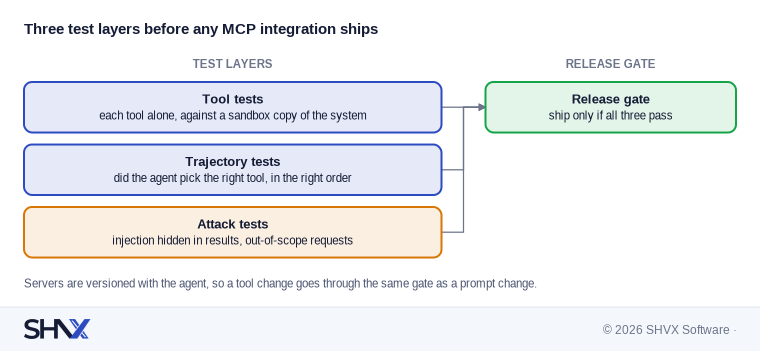
- Test each tool alone against a sandbox copy of the system.
- Test the agent’s choices: right tool, right order, no skipped checks. Our guide to testing AI agents explains these trajectory tests.
- Version the servers with the agent, so a change to a tool runs through the same release gate as a prompt change. See DevOps for AI agents.
Common mistakes
- Installing a public MCP server without reviewing what it can reach.
- Connecting the agent with a person’s account.
- Offering every tool a system has instead of the few the job needs.
- Trusting text that comes back from tools.
- No logs until something goes wrong.
Product facts checked against the MCP project blog in November 2026.
How SHVX can help
Planning to connect an agent to your CRM, ERP or databases? We’ll review your integration plan and its permissions, and give you a written list of what to tighten before you build.
Learn more about Agent Engineering.
FAQ
What is MCP in AI?
Model Context Protocol, an open standard that lets AI agents discover and call tools in other systems through one common interface.
Do I need an MCP server for every system?
Usually one per system or per group of related tools. Many vendors already publish one for their product.
Can MCP connect an AI agent to a system with no API?
Not on its own: MCP needs something to call. Our guide to apps with no API or MCP server covers the routes in, and an MCP server can then wrap whichever you choose.
Is MCP secure?
The protocol supports standard sign-in and authorization. Safety still depends on narrow tools, the agent’s own identity, approvals for risky actions and reviewing third-party servers.